
Code Confidence debugging features
The following screenshot illustrates debugging of the eCos twothreads example application using a Code Confidence remote debugging launcher to initiate a CDT debug session:
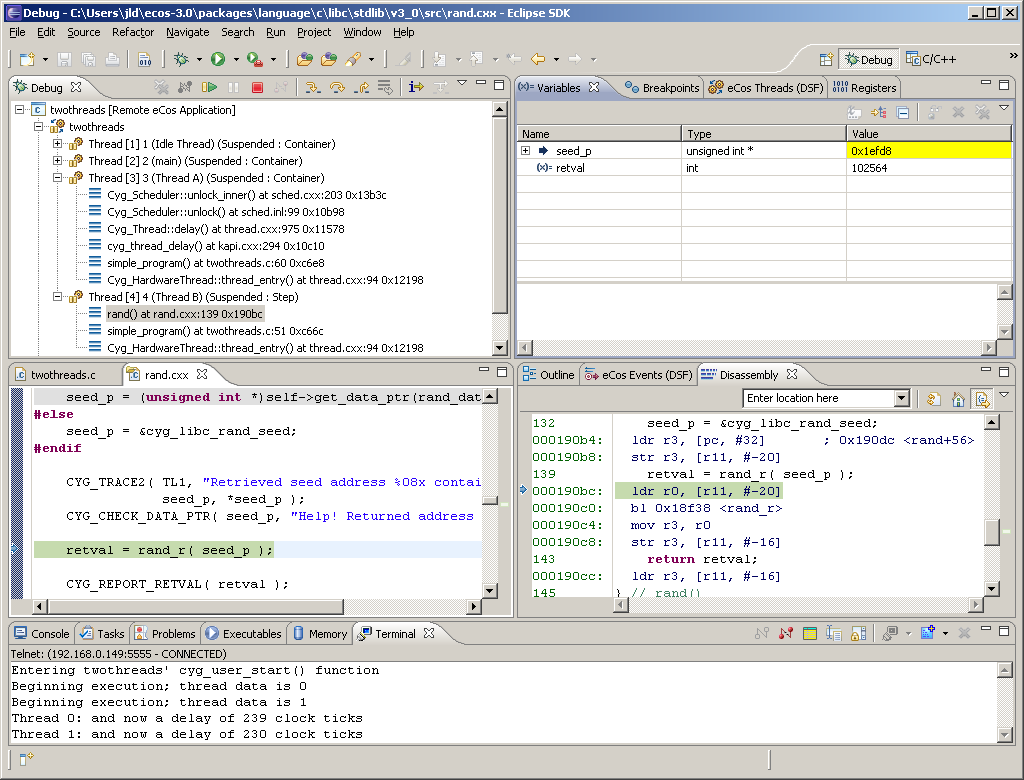
The Debug view indicates 4 threads of execution within the application. The call stacks of the two application threads are visible. The application is currently suspended within the rand() function of the eCos C library. Individual stack frames may be selected within this view. Application execution is controlled by a set of icons immediately above the tree. Icons for resume, suspend, step in, step over and step out are visible.
Local variables of the selected stack frame are visible in the Variables view. The value of the seed_p variable is highlighed, indicating that the value has changed since the application was last suspended. The value of a variable may be presented in hexadecimal or decimal formats and may also be modified for debugging purposes.
The source code line at which the application is currently suspended is shown with a green background in a CDT source code editor pane. Code towards the top of this pane is presented with a grey background since it has been eliminated by the C pre-processor. Syntax colouring can also be observed.
A Disassembly view presenting machine code instructions interleaved with source code is seen to the right of the editor. An instruction stepping mode allows applications to be executed one machine code instruction at a time. Changes to CPU registers may be observed in the Registers view (not visible).
At the bottom of the workbench, a Terminal view presents diagnostic and trace information which has been passed up to the debugger from the remote target. Tabs for the kernel-aware debug views are also visible. Back…

